Home
Microsoft 365
Linux
Windows
Powershell
Cloud Computing
    Citrix Xendesktop
    Citrix XenApp
Useful links
About
  • Home
  • Microsoft 365
  • Linux
  • Windows
  • Powershell
  • Cloud Computing
    • Citrix Xendesktop
    • Citrix XenApp
  • Useful links
  • About
ajni.IT -
Citrix XenApp•Citrix Xendesktop•Cloud Computing

Citrix NetScaler allow password change when password expires

June 20, 2023 by AJNI No Comments

In this article we are going to configure password change through Citrix Netscaler, which is very handy nowadays that a lot of people work from home and are rarely in the office. The steps are very simple but you should always think what the impact of the change could be before blindy following my screenshots.

First of all, you need a certificate on the Domain Controller(s). Since Microsoft does not allow plaintext password change through port 389, you need a certificate for the SSL Port 636. This can be achieved with an internal Certificate Authority. Check my article here: https://www.ajni.it/2020/08/active-directory-certificate-services-ad-cs-on-windows-server-2019/

There is a quick way with a self signed certificate, but I would recommend using a Certificate Authority.

New-SelfSignedCertificate -DnsName dc01, dc01.ajni.it, dc02, dc02.ajni.it -CertStoreLocation cert:\LocalMachine\My

You can also insert multiple Subject Alternative Names separated by comma, that might include two or more Domain Controllers like in the example above.

Testing can be done with lpd.exe, make sure that the newly generated certificate is also placed in the Trusted Root Certificate Authorities.

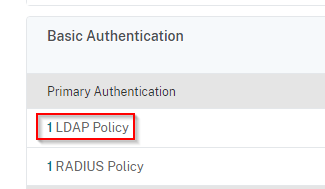
In Citrix Netscaler go to Citrix Gateway > Virtual Servers > Select the VIP > Primary Authentication > Select the LDAP Policy:

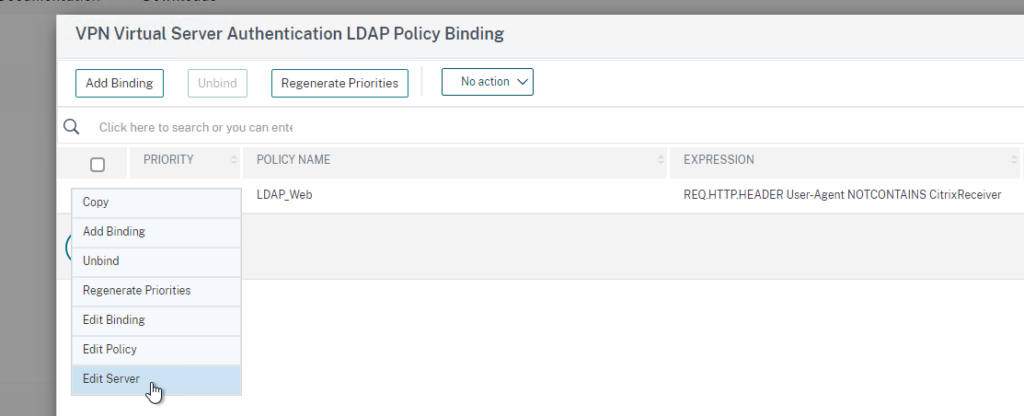
Edit Server

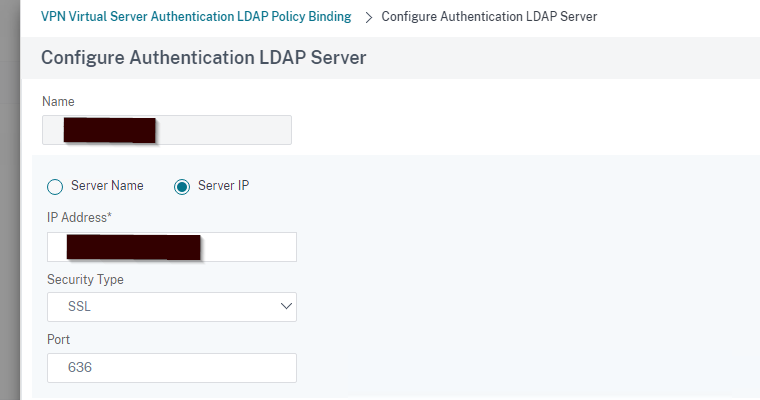
Select SSL under Security Type and Port 636

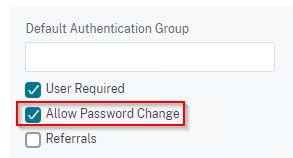
Further down, select Allow Password Change.

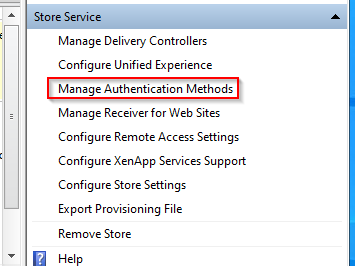
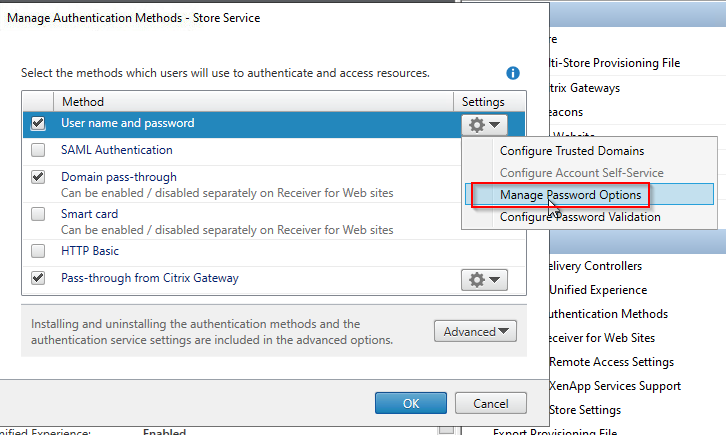
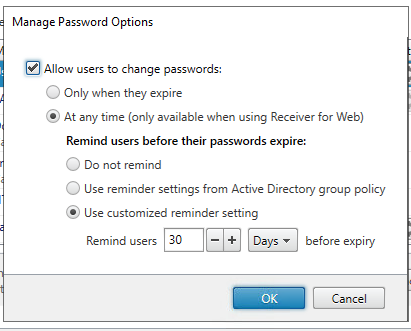
In Citrix Storefront, make sure Password Change is enabled:

The password reminder can also be enabled.

That’s it. Make sure your NetScaler Config is saved!

References:

https://c4rm0.wordpress.com/netscaler-allow-user-ad-password-changes/

https://anandthearchitect.com/2019/10/10/active-directory-self-signed-certificate-for-ldaps/

Reading time: 1 min
Microsoft 365

DomainKeys Identified Mail and Microsoft 365 Exchange Online and how to configure it

April 27, 2023 by AJNI No Comments

Mailing is daily business in an organization and to increase the trustworthiness of your domain, you should firstly configure a TXT/SPF record and secondly configure DomainKeys, also known as DKIM.

DKIM works by adding a digital signature to the header of an email message that verifies that the message was sent from a trusted source and has not been tampered with during transmission.
When an email is sent using DKIM, the sender’s domain name is included in the digital signature. This allows the receiving email server to verify that the message was sent from an authorized sender and that the message has not been modified in transit. If the digital signature is valid, the email is considered to be legitimate and is delivered to the recipient’s inbox. If the digital signature is invalid, the email is likely to be marked as spam or blocked entirely.

Configuring DKIM if you have Microsoft 365 Exchange Online as a mail system is very straightforward. Just go to https://security.microsoft.com/dkimv2 and enable DKIM on the corresponding domain. Afterwards create the DNS entries as instructed by Microsoft 365.

Usually you’ll have 2 entries, for example:

selector1 and selector2._domainkey.ajni.it CNAME pointing to a Microsoft internal DNS entry.

After creating the DNS entries (like usual you’ll have to wait a bit because of DNS and its slowness), you can verify them in the M365 portal and activate the DKIM signature on all emails (see reference below).

If you have a newsletter solution that does not use Microsoft 365 to send emails, you should check whether they offer DKIM (they should otherwise it’s not a proper newsletter software). Usually you’ll have to configure two CNAME DNS entries on your domain with a selector, similar to Microsoft 365:

k1_domainkey.domain.com and k2_domainkey.domain.com CNAME points to the newsletter solution domain. The TXT record of that DNS record contains the public key. See mailchimp for example:

Looking at the message headers, you can see that domain signature is all right:

ARC-Authentication-Results  i=2; mx.google.com; dkim=pass header.i=@ajni.it header.s=selector1 header.b=TJJLfT54; arc=pass (i=1 spf=pass spfdomain=ajni.it dkim=pass dkdomain=ajni.it dmarc=pass fromdomain=ajni.it); spf=pass (google.com: domain of test@ajni.it designates 2a01:111:f400:7e24::614 as permitted sender) smtp.mailfrom=test@ajni.it

The next step would be to configure a DMARC policy, so that someone trying to impersonate your domain gets rejected and reported to you.

When an email is received, the receiving email server checks the sender’s domain for a DMARC policy, and then follows the instructions specified in that policy to determine whether the email is legitimate or not.

A sample DMARC policy would look like this:

_dmarc.ajni.it TXT
v=DMARC1; p=reject; rua=mailto:dmarcreports@example.com; ruf=mailto:dmarcfailures@example.com; sp=none; aspf=r;

This policy tells email receivers to reject any messages that fail authentication checks (p=reject), and to send aggregate and forensic DMARC reports to the specified email addresses (rua and ruf). The policy also indicates that the domain owner is not enforcing a policy for messages that do not pass SPF checks (sp=none), and that they are requesting SPF-aligned messages to be treated as passing but are not requiring DKIM alignment to pass (aspf=r).

This is just an example and policies may vary depending on the organization’s specific needs and email infrastructure.

References:

https://learn.microsoft.com/en-us/microsoft-365/security/office-365-security/email-authentication-dkim-configure?view=o365-worldwide

Reading time: 2 min
Citrix XenApp•Citrix Xendesktop•VDI

Citrix Virtual Apps and Desktops 2203+ (or even older) cannot reconnect disconnected session

April 12, 2023 by AJNI No Comments

Having issues with users reconnecting a disconnected Citrix Virtual Apps and Desktops session? These keys might help you. Citrix support confirmed, that they help starting at Server 2016 VDA.

Fastreconnect is a feature that was introduced by Microsoft to enhance session reconnect through RDP, but through Citrix ICA it seems that is does not improve anything.

HKEY_LOCAL_MACHINE\SOFTWARE\Citrix\Reconnect
FastReconnect REG_DWORD 0

HKEY_LOCAL_MACHINE\SOFTWARE\Citrix\Ica\GroupPolicy
EnforceUserPolicyEvaluationSuccess REG_DWORD 0

References:

https://www.reddit.com/r/Citrix/comments/x6frfq/ltsr_2203_disconnected_sessions_are_lost_upon/

Reading time: 1 min
Citrix XenApp•Cloud Computing•Powershell•Windows Server

Citrix Virtual Apps and Desktops 2203+ grey screen/ConnectionFailure in Eventviewer

March 19, 2023 by AJNI No Comments

Having grey screen issues with CVAD 2203+ and higher on Windows Server 2022 Terminal server? I had this issue occurring on Citrix 2212. Try running this script. It might help you out. Do a VM backup or snapshot before running the script, just to be sure.

$iddHwId = “VEN_5853&DEV_1003”
$pnpDispDevPath = “HKLM:\SYSTEM\CurrentControlSet\Enum\SWD\RemoteDisplayEnum”

try
{
    $iddDevEntries = Get-ChildItem -Path $pnpDispDevPath -ErrorAction Stop| Where-Object Name -Match $iddHwId
}
catch
{
    Write-Output “Failed to query remote ID device entries”
    Write-Output $_
    return
}

if ($iddDevEntries.Count -eq 0)
{
     Write-Output “No remote ID device entries found.”
     return
}

$iddDevEntries | ForEach-Object {
    
    $devName = ($_.Name -Split “\\”)[-1]
    
    try
    {
        Remove-ItemProperty -Path $_.PsPath * -ErrorAction Stop
        Write-Output “Cleared values for $devName”
    }
    catch
    {
        Write-Output “Failed to clear values for $devName”
        Write-Output $_
    }
}

This saved my day:

https://discussions.citrix.com/topic/417832-cvad-connectionfailure-after-install-ltsr-2203-cu2-on-server-2022/page/3/

Reading time: 1 min
AI & Deep Learning

Have you already heard of ChatGPT, AI and Language Models?

March 6, 2023 by AJNI No Comments

ChatGPT is an artificial intelligence language model that has been trained on a massive dataset of written text, allowing it to generate human-like responses to a wide range of queries and questions. As part of the OpenAI project, ChatGPT is one of the most sophisticated AI language models available today, capable of understanding and processing natural language input in a way that was once considered impossible.

The development of ChatGPT and other AI language models like it has been driven by a desire to create machines that can more effectively communicate with humans. With the ability to understand and generate language, these models have the potential to transform many industries, including customer service, education, and healthcare. By enabling machines to understand and respond to human language, we can create more efficient and personalized interactions between humans and machines.

One of the key benefits of AI language models like ChatGPT is their ability to learn from vast amounts of data. By analyzing large amounts of text, these models can identify patterns and relationships within language, allowing them to generate responses that are both accurate and contextually appropriate. This has significant implications for areas such as natural language processing, machine translation, and text analysis.

However, the development of AI language models like ChatGPT also raises important ethical considerations. As these models become more sophisticated, there is a risk that they could be used to create convincing fake news or other forms of disinformation. Additionally, there are concerns that these models could be used to create biased or discriminatory responses, particularly if they are trained on data that reflects societal biases.

Ultimately, the development of ChatGPT and other AI language models is a significant step forward in our ability to communicate with machines. While there are certainly challenges and risks associated with this technology, the potential benefits are vast, and it is likely that AI language models will play an increasingly important role in our lives in the years to come.

Sources:

Generated by ChatGPT https://chat.openai.com/chat

Reading time: 1 min
Page 10 of 29« First...«9101112»20...Last »

Like what you are reading? Buy me a coffee.

Tip Of the Day

  • Convert Cloud User to synched User (Updated 2025)

    4 days ago

Keep in touch

Oh hi there!
It’s nice to meet you.

Sign up to receive awesome content in your inbox, every month.

Check your inbox or spam folder to confirm your subscription.

Categories

  • AI & Deep Learning (1)
  • Azure (20)
  • Citrix XenApp (21)
  • Citrix Xendesktop (13)
  • Cloud Computing (40)
  • Coding (1)
  • Hyper-V (10)
  • Linux (8)
  • Microsoft 365 (26)
  • Powershell (22)
  • Security (7)
  • VDI (16)
  • Virtualization (21)
  • VMware (12)
  • Windows (21)
  • Windows Client OS (40)
  • Windows Server (94)

Archives

  • December 2025
  • August 2025
  • May 2025
  • April 2025
  • February 2025
  • January 2025
  • December 2024
  • November 2024
  • October 2024
  • September 2024
  • July 2024
  • June 2024
  • May 2024
  • April 2024
  • March 2024
  • February 2024
  • January 2024
  • December 2023
  • September 2023
  • August 2023
  • July 2023
  • June 2023
  • April 2023
  • March 2023
  • January 2023
  • December 2022
  • November 2022
  • October 2022
  • September 2022
  • August 2022
  • July 2022
  • June 2022
  • May 2022
  • February 2022
  • January 2022
  • December 2021
  • November 2021
  • October 2021
  • September 2021
  • August 2021
  • June 2021
  • May 2021
  • April 2021
  • March 2021
  • February 2021
  • December 2020
  • November 2020
  • September 2020
  • August 2020
  • July 2020
  • June 2020
  • May 2020
  • April 2020
  • March 2020
  • February 2020
  • November 2019
  • October 2019
  • September 2019
  • August 2019
  • July 2019
  • June 2019
  • May 2019
  • April 2019
  • March 2019

ajni IT © 2019